
I’m not going to go into the whys and wherefores in this post of using Smite and Atonement as part of your healing toolkit, but there are a couple of tricks that I wanted to share that might help the potential Smite user, based on some playing last night.
Macros
First up is a macro suggested by Andy in a comment on the 4.0.1 guide.
#showtooltip Smite
/cast [@targettarget, harm] Smite; Smite
It’s a more failsafe version of just having Smite on your bars. If you have a hostile target selected, it’ll just cast Smite. If you have a friendly targeted, e.g. a tank, this will cast Smite at their target instead.
If you want absolute control over your Smite target, you could use a focus macro. This one’s borrowed from our trusty CC macros:
#showtooltip
/clearfocus [modifier:alt]
/focus [@focus,noexists]; [@focus,dead]
/stopcasting
/cast [@focus,exists,harm] Smite;Smite
If you don’t have a focus already, this macro will set your target to your focus and then Smite it (assuming it’s an enemy). If you do have a focus, the macro will Smite it. And if you hold down Alt, the macro will change your focus to your current target, and then Smite it.
I’d assume you’d probably have the boss as your focus, and just hit this button whenever you want to cast Smite.
This next macro is good for when you want to Smite something, but don’t want to use your focus for it. This is probably a better choice for soloing because it’s not as controlled as the first.
#showtooltip
/targetenemy [noexists][dead][help]
/cast Smite
If you don’t have a target, this macro will act as if you’d hit Tab, and then cast Smite on that target. It’ll work up to 40 yards, exactly the same as Tab. While you have a target, this macro will continue to Smite it without any target switching.
If you have a dead target (or your target is friendly), the macro will then pick a new target and Smite that.
[This is a slight update on the one I posted on PlusHeal, with the conditionals linked more efficiently]
The three previous macros are really actionbar macros, just taking the targeting out of the equation to some extent. The following macro can help you integrate Smite with a click-healing setup:
/cast [@mouseovertarget] Smite
You can add this to your click-bindings, so you can click on a tank and the macro will cast Smite on their target (hopefully the boss). I chose not to go this route, because I ran out of mouse button bindings (I need a tidy-up!), so I’m using VuhDo directly, as I’ll explain below.
UI
Here’s how I have VuhDo set up (using the auto-generated test names, since I didn’t get any screenshots in last night’s ToC):
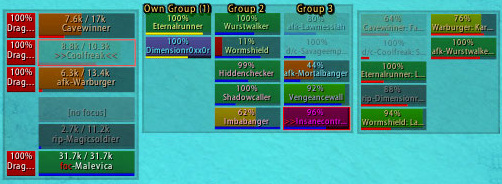
The raid is in the middle panel, pets in the right, and main tanks and my focus in the left panel. Next to the main tanks are small red squares, which are target-of-target frames showing what the tanks are targeting. Instead of using up a regular click binding for a dedicated macro, I used VuhDo’s facility to bind separate spells for hostile targets and I have Smite set up for a hostile target.
So I click on the target frame to Smite it, and move my mouse across a little to cast a direct healing spell on the tank himself when I need to.
I don’t know if you can do a similar trick with Grid or Healbot, but I would imagine it’s possible (Grid can do everything, after all!). Perhaps someone else knows of a suitable guide.
The other thing addons can help with is watching for a 5-stack of Evangelism so you know when to cast Archangel to get that mana back. I’m using PowerAuras for this:
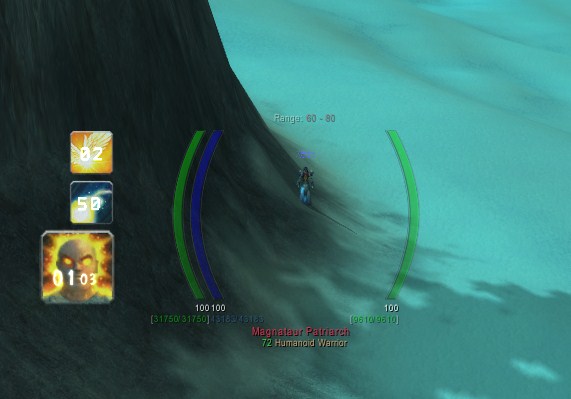
The top icon will pop up when I have 5 stacks of Evangelism, I’m below 85% mana, and Archangel is castable, and the number over the icon is the time remaining, so I can refresh the stack up or consume it if it looks like falling off.
This PowerAura is a linked set of three, which I’ve included below in case you want to adapt something to your own needs:
Archangel Castable:
Version:3.0.0W; icon:ability_priest_archangel; buffname:Archangel; x:-244; bufftype:7; owntex:true; mine:true; combat:true; size:0.2; y:5; texmode:2; timer.h:1.56; timer.Texture:WhiteRabbit; timer.enabled:true; timer.cents:false; timer.y:5; timer.x:-247
Mana below 85%:
Version:3.0.0W; bufftype:9; threshold:85; off:true; combat:true; texmode:2
Evangelism at 5 stacks:
Version:3.0.0W; icon:Spell_Holy_DivineIllumination; buffname:Evangelism; x:-244; customname:Archangel; stacks:5; texture:54; mine:true; customtex:true; combat:true; size:0.2; y:62; timer.h:1.54; timer.Texture:WhiteRabbit; timer.enabled:true; timer.cents:false; timer.Relative:CENTER
I use the Evangelism one as the main Aura, and require the previous two to be matched as well for it to be displayed.
Glyphs
Finally, this is a bit of a repeat, but if you want to use Smite much, make sure you’re using the Glyph of Divine Accuracy to make sure they land!
Also, if Smite is something you use a lot, the Glyph of Smite will be a big boost. If you Smite infrequently, then a 20% boost for 12s is probably a waste of the time you spend putting HF up, but if you’re tank healing it will probably be a good way to go.
Thanks to Sytax in the comments for his input. Glyph of Smite isn’t actually a dramatically good choice, as I’d first thought, primarily because of the newly reduced 7s duration of Holy Fire (which I hadn’t noticed when I wrote the post), meaning you can only get 4-5 improved Smites in that time, depending on your haste (assuming the last cast gets buffed by when you start casting rather than when you complete the cast). However, it’s not by any means useless either.
Below 22% total haste, even if all you do is Smite, you will see little difference between the two, with a tiny, tiny increase from the glyph. Between 22% and 50% haste, which is where we’ll all probably live, you’ll see a small increase in throughput from the glyph, and another small increase above 50% haste.
Here’s a graph, showing the effect of increasing total Haste %:
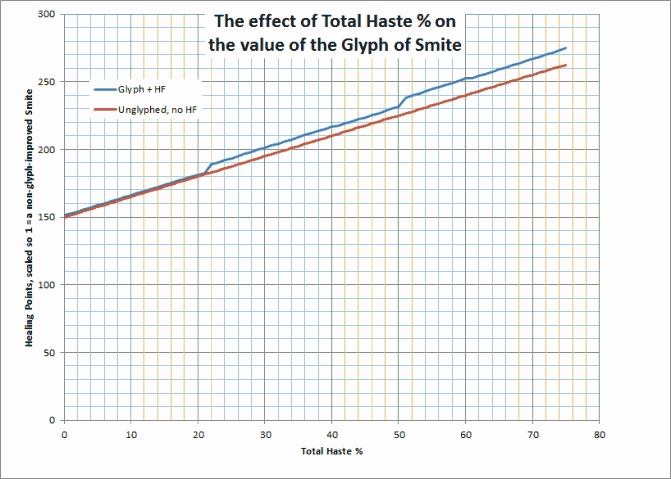
This assumes you Holy Fire, cast Smite until HF is off cooldown again, and the cycle starts over. I normalised the numbers it so that a “normal” Smite is worth 1 Healing point, and so a Smite improved by the glyph is worth 1.2, and I simulated over 300s, which is probably overkill, but at least averages things out nicely.
Good luck with the Smiting!
Possibly Related Posts:



